PAY023 – Re-Engaged Clients Payments
The **Reports > Standard2 Reports > Payments > CLI023 Re-Engaged Clients **report allows you to identify clients who have not given to your organisation over a date range, and then, have started giving again after a certain date.
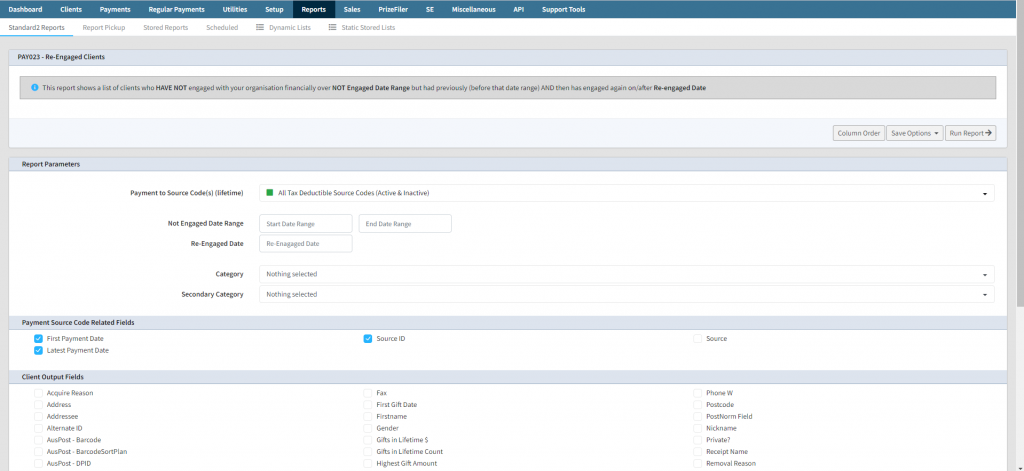
This report allows for some criteria to identify when clients have re-engaged with your organisation.
- Source Code **– **this is the source code used to test for Engaged. Most common is to use All Tax Deductible Source Codes (Active + Inactive). This will be used for testing for Engaged and Non-Engaged – by default this is selected.
- **Not Engaged Date Range **– this is the date range that the client has not made any payments between.
- **Engaged Date Range **– this is the date you wish to select that any payments have happened since. This is the date that the client has re-engaged (financially) with your organisation.
- **Category **and Secondary Category allows you to include only clients in the specified categories or secondary categories.
The output fields include all the Client fields and also some regarding payments, including
- **First Payment Date **– the date the client first ever made a payment to your organisation
- **Latest Payment Date – **the most recent date the client donated
- **Source ID **and **Source **– is the source code that the client re-engaged with.
After you have selected the input criteria and output fields, click Run Report
engaged
pay023
report