Setting the Payment Method for Auto Regular Payments
Automatic Deducted regular payments that are processed via a Payment Gateway (Credit Card or Direct Debit) need to have a payment method associated with them for the payment to determine what the Payment Method was for the transaction.
From Setup > Payments > Payment Methods
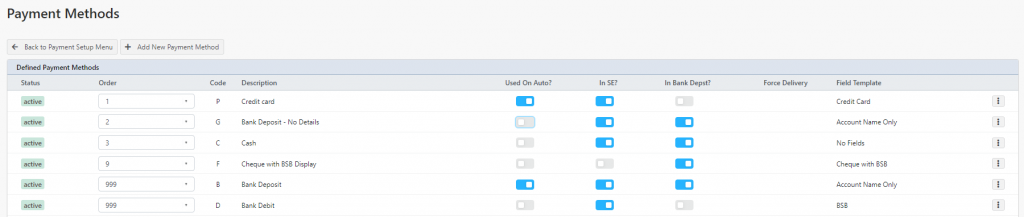
You will see your list of Payment Methods. The **Used on Auto? **column is important here.
For any regular payments that are processed using a Credit Card, you will wish to set **ON **(showing blue) for the payment method. The field template for this must be Credit Card
If your Payment Gateway supports direct debit, for the payment method that is using field templates **Account Name Only, Direct Deposit **or Direct Deposit (Gateway) – whichever is set for Used on Auto? – direct debit automatic payments will be allocated to that payment method.
Capability of payment gateways vary, and not all payment gateways will support Direct Debit. Please contact Profiler Support (or your bank) for further information.