Digital Media Regions
When assigning a Digital Campaign for a banner advert – you need to define the region or display point that the banner advert will be displayed on. To define regions, you can go to Sales > Web Banner Locations

Upon loading this screen, you will see the existing regions defined, and if a current Sales campaign is allocated to the region.
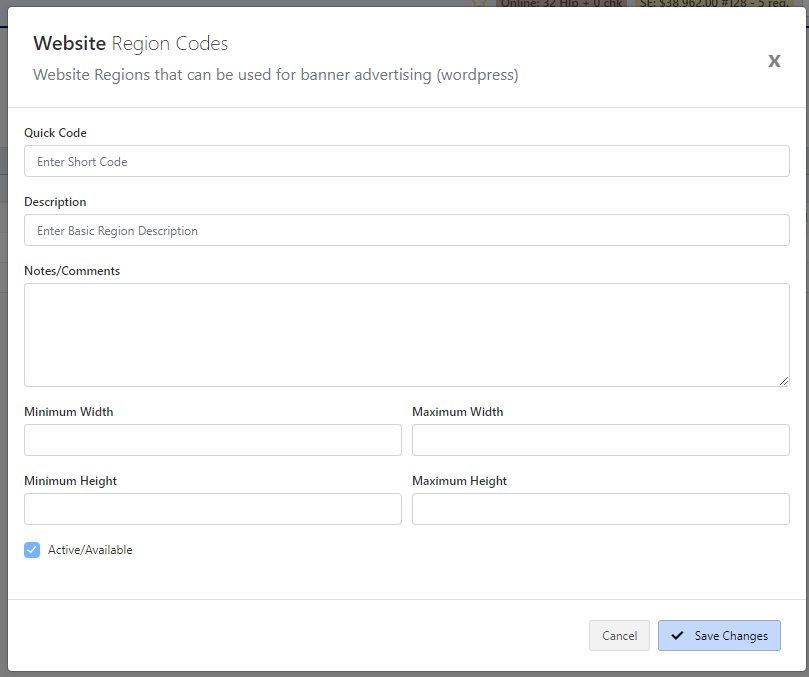
When creating a new region (or editing an existing region) you can modify the aspects of the Website Region.
- The **Short Code **is required for loading the region – this usually is a small 2 or 3 alpha-numeric code that identifies the region (ie. FOT = Footer, HP1 = Home Page Advert 1)
- The **Description **allows you to describe the region (ie. Footer)
- Notes/Comments allows you to put a description about the location and any notes. These are not displayed anywhere
- The **Minimum **and Maximum Width and Height are values in pixels which defines the maximum height and width for the media assets to be used in this region. This allows the right size assets to fit in the window for the advertising window on your website.
Once you have defined your region, you can click Save Changes and this region will be available to assigning to a Digital Campaign
advert
banner
campaign
digital
media
regions