Simplify Payment Gateway Setup
Profiler supports the Simplify payment gateway as provided by MasterCard and various banking institutions.
To setup Simplify inside Profiler go to **Setup > Payments > Accounts + Gateways **and click Add New Payment Gateway
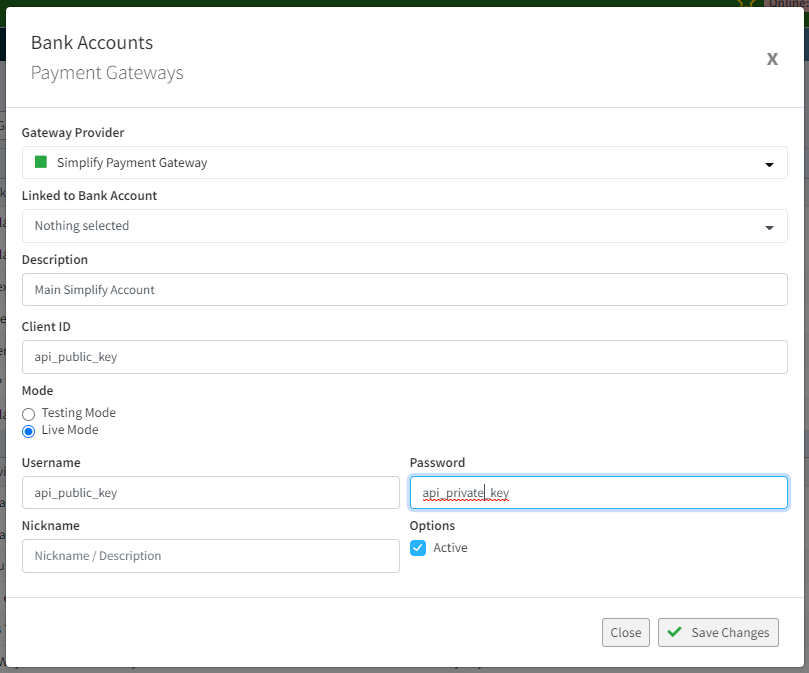
- In **Gateway Provider **choose **Simplify Payment Gateway **
- In **Description **give a description so you know what this is (i.e Main Simplify Gateway)
- **Client ID **requires the **API Public Key **as provided by your Simplify setup
- **Username **also requires the same **API Public Key **as provided in the **Client ID **field
- Password requires the API Private Key as provided by your Simplify setup
After you have entered this required information – click Save Changes and this will activate your gateway.
Test / Live mode in this setup makes no difference. If you wish to use Test mode – use the Sandbox API keys that Simplify provide you. Profiler will use whatever API keys are present.
If you wish to use this gateway as the default payment gateway, once you have clicked **Save Changes **on the “…” menu for the gateway choose “Set as Default Payment Gateway” – this will set it as the default for any new source codes you create, and also assign to any existing source codes that have been made that currently have not had a gateway set for them.
The Simplify test cards for testing the gateway are available here